问题排查
问题描述
服务在没有预警的情况下莫名重启; 经过查询日志平台, 发现以下的日志
java.lang.OutOfMemoryError: Java heap space
Dumping heap to /dump/service_name_a1b21.hprof …
Heap dump file created [1568487987 bytes in 9.043 secs]
问题分析
- 下载 service_name_a1b21.hprof 堆的 dump 文件
- 使用 Eclipse Memory Analyzer 打开 hprof 文件
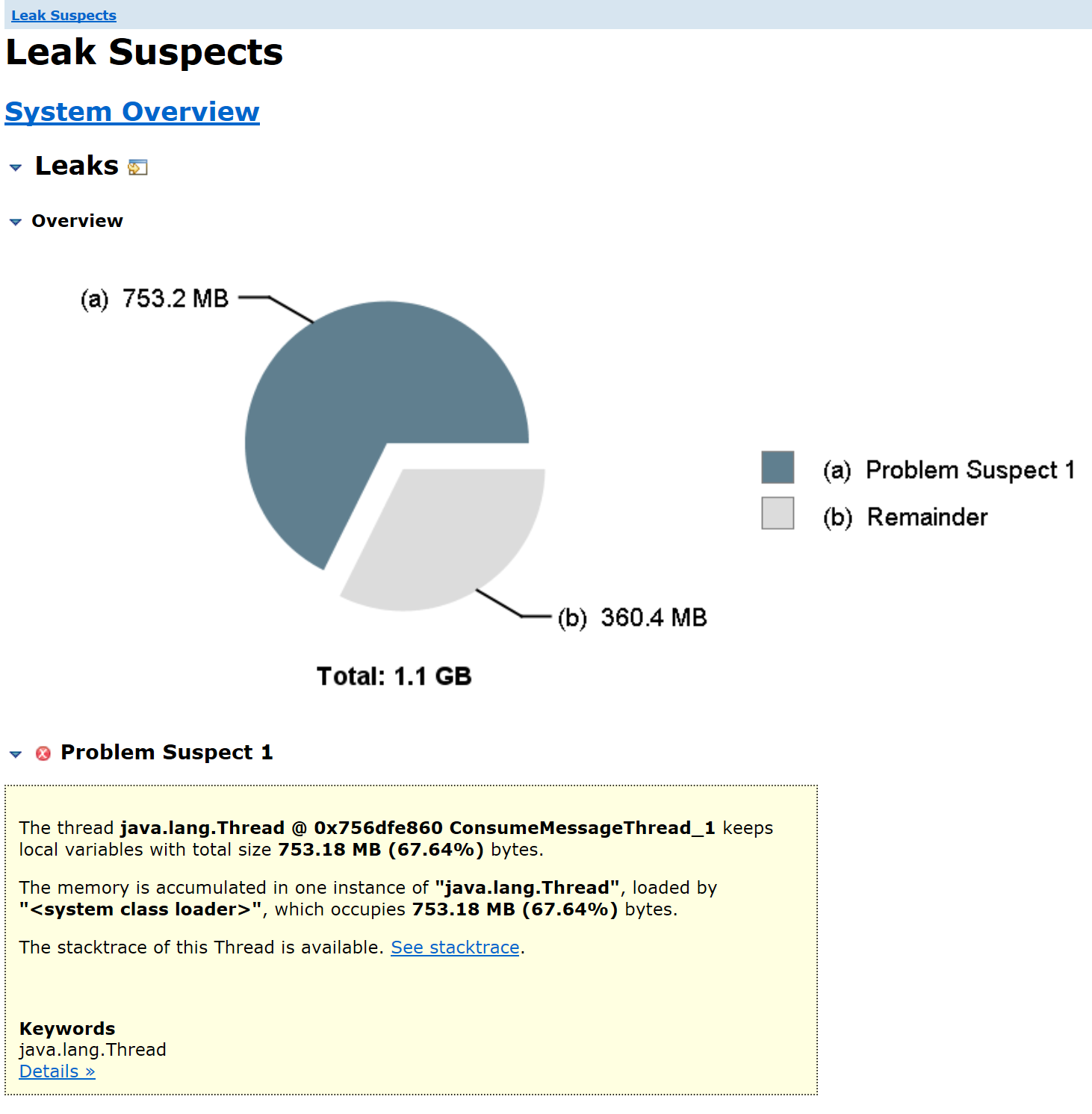
- 打开 Leak Suspects 扇形图
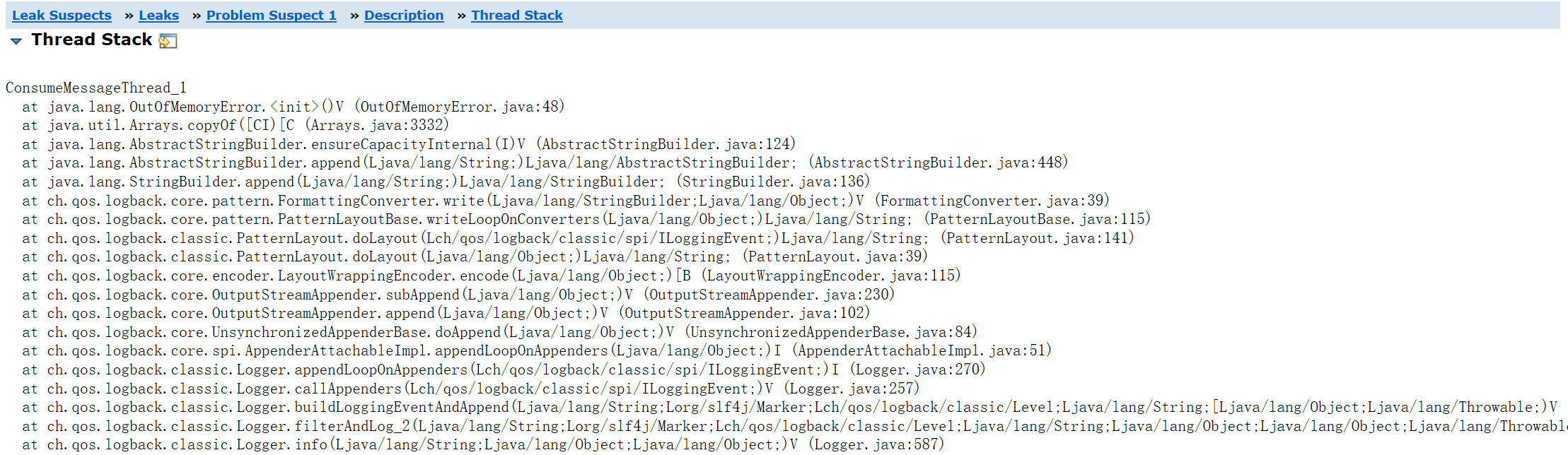
- 查询错误栈信息
- 查看 Dominator Tree(支配树)
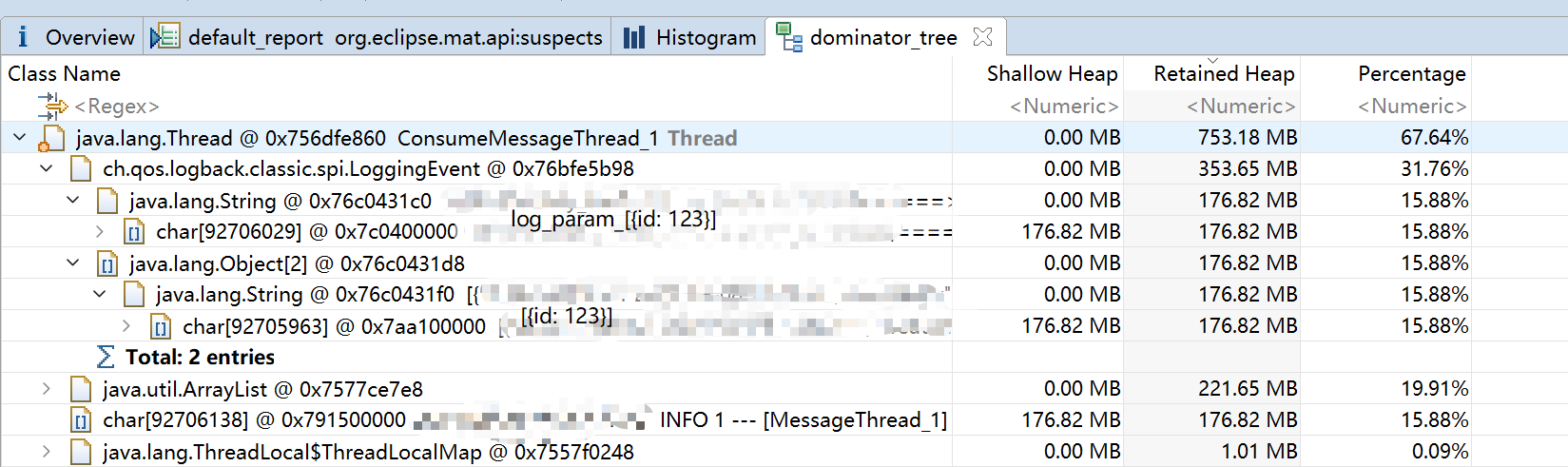
根据 Retain Heap 排序, 发现 char[]0x7c0400000;char[]0x7aa100000;char[]0x791500000, 三个字符串内容基本相同, 并且占用内存较大
结合错误栈信息和代码, 定位出是由于日志打印所需的字符串参数拼接时, 无法分配足够的内存导致的
解决方案
- 尽量减少打印内容(如为空字段无需打印)
- 调整打印方式, 对于大批量的数据, 分批次打印甚至不打印
相关
参考链接
Eclipse MAT 工具使用说明
Eclipse MAT 工具概念说明
MAT
下载
最新版本
历史版本
最新可使用jdk8的版本: Memory Analyzer 1.10.0 Release
概念说明
相关工具
JVisualVM
下载 dump 文件
jmap -dump:format=b,file=文件名 进程PID
实时查看 JVM 内存
命令:jmap -header 进程PID; 图形化工具: jconsole
同类代码
1
2
3
4
5
6
7
8
9
10
11
12
13
14
15
16
17
18
19
20
21
22
23
24
25
26
27
28
29
30
31
32
33
34
35
36
37
38
39
40
41
42
43
44
45
46
47
48
49
50
51
52
53
54
55
56
57
58
59
60
61
62
63
64
65
66
67
68
69
70
71
72
73
74
75
76
77
78
79
80
81
82
83
84
85
86
87
88
89
90
91
92
93
94
95
96
97
98
99
100
101
102
103
104
105
106
| import org.codehaus.jackson.map.ObjectMapper;
import org.slf4j.LoggerFactory;
import java.io.IOException;
import java.text.SimpleDateFormat;
import java.util.ArrayList;
import java.util.Date;
import java.util.List;
import java.util.Random;
public class DumpTest {
private static final int BYTE_TO_MB = 1024 * 1024;
public static void main(String[] args) {
Object data = mockData();
int contentMemory = getContentMemory(toJSON(data));
System.out.println("mock data json size = " + contentMemory + " Byte; " + contentMemory / 1024 / 1024.0 + " Mb");
log(data);
}
public static int getContentMemory(String str) {
return str.length() * 2;
}
public static Object mockData() {
Random random = new Random(BYTE_TO_MB);
int times = 4;
int total = BYTE_TO_MB / 2 * times - random.nextInt(BYTE_TO_MB / 8);
int singleTimes = total / times;
List<char[]> list = new ArrayList<>();
for (int i = 0; i < times; i++) {
char[] bytes = new char[singleTimes];
for (int j = bytes.length - 1; j >= 0; j--) {
bytes[j] = (char) ('0' + random.nextInt(10));
}
list.add(bytes);
}
return list;
}
public static String toJSON(Object obj) {
ObjectMapper objectMapper = new ObjectMapper();
try {
return objectMapper.writeValueAsString(obj);
} catch (IOException e) {
throw new RuntimeException(e);
}
}
public static void log(Object obj) {
printMemory();
LoggerFactory.getLogger(DumpTest.class).debug("log_obj: {}", toJSON(obj));
printMemory();
}
public static void printMemory() {
try {
Thread.sleep(100);
} catch (InterruptedException e) {
throw new RuntimeException(e);
}
String date = new SimpleDateFormat("yyyy-MM-dd HH:mm:ss.SSS").format(new Date());
Runtime rt = Runtime.getRuntime();
long max = rt.maxMemory();
long free = rt.freeMemory();
long usable = max - free;
System.out.println("================================================================" + date);
System.out.println("JVM已使用内存 = " + (usable / BYTE_TO_MB));
System.out.println("JVM未使用内存 = " + (free / BYTE_TO_MB));
System.out.println("JVM最大(已分配)内存 = " + (max / BYTE_TO_MB));
System.out.println("================================================================" + date);
}
}
|